 MyCelium Wiki
Anvil Cost Calculator features
The anvil button
Every anvil screen gets a small XP button in its top-right corner. Clicking it opens the planner on top of the anvil without closing it, so nothing is dropped and nothing is sent to the server. Back to anvil (or Esc) brings the anvil back with your items exactly where you left them.
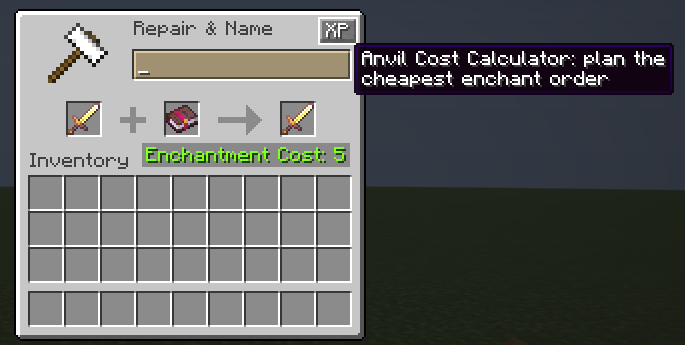
If an item is already in the anvil's left slot, the planner starts from it: the same item, the enchantments it carries, and how many times it has been through an anvil. You only have to add the books.
Picking the item
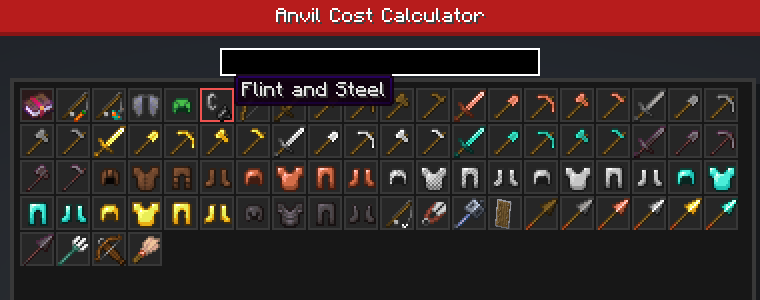
The first page is a searchable grid of every item at least one enchantment can go on. The list comes straight from the game, so it covers every tool, weapon and armor piece plus the odd ones: flint and steel, shears, fishing rods, carrots on a stick, elytra, shields, brushes, maces, tridents, and modded items that use the normal enchantment system. Items that can only take a curse (carved pumpkins, mob heads, compasses) are left out, since there is nothing to plan for them. Type in the search box to filter by name or item id.
The first slot, Enchanted Book, is for combining books only: every enchantment is allowed, and the plan builds one book out of the others.
Setting it up
The second page lists every enchantment the item accepts, one row each, with two level selectors:
- On item is what the item already has.
- Book is the book you want to add, one book per enchantment.
- Anvil uses (top left) is how many times the item went through an anvil before. Each use makes the next one pricier: 1, 3, 7, 15, 31 extra levels.
Click + or - to change a level; Shift-click jumps straight to the max or back to zero. Levels at their maximum turn green. Enchantments that cannot sit next to your choices (Sharpness and Smite, Mending and Infinity, the protection types, and so on) are greyed out and locked; hover the name to see what they clash with. Curses are shown in red. A red bar on the left marks rows with a book, a grey one rows the item already has.
Reading the plan
The right side updates as you click. Each line is one anvil operation: the first thing goes in the left slot, the second in the right slot. #1, #2 and so on mean "the result of that step", so you can follow the plan top to bottom without writing anything down.
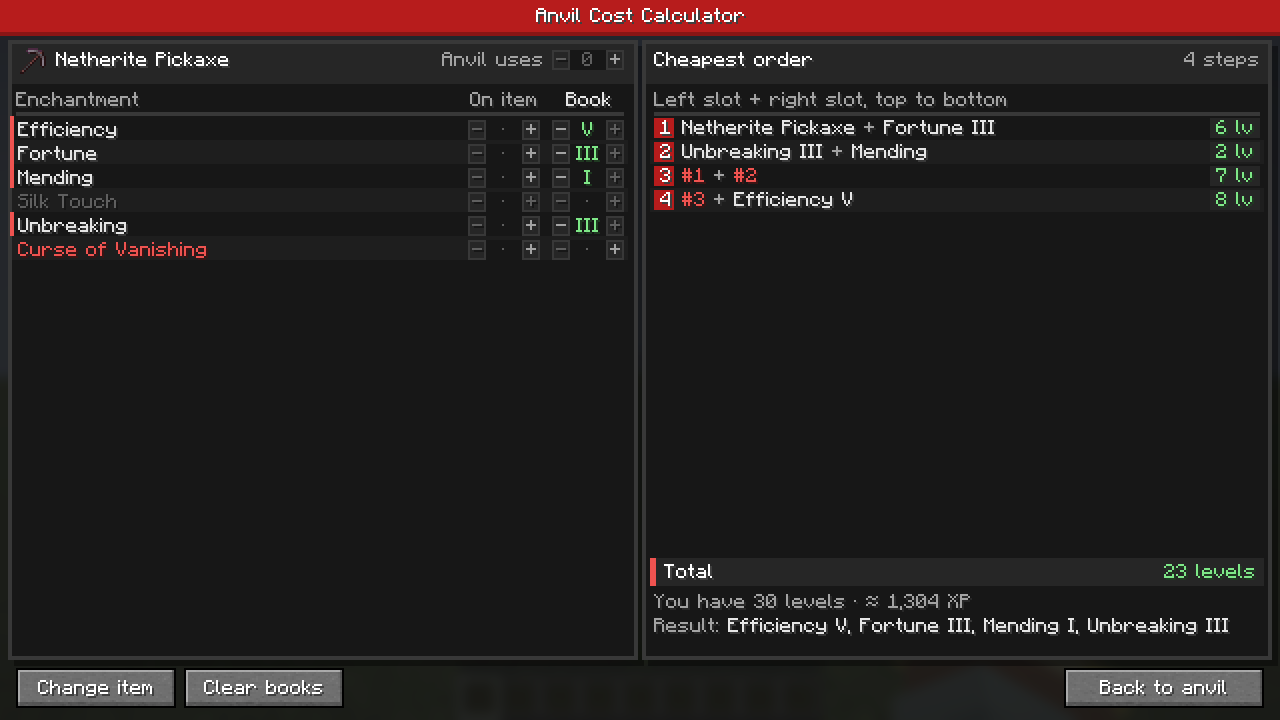
- Step costs are green up to 15 levels, orange up to 39, and red at 40 or more, which survival anvils refuse ("Too Expensive!").
- Total is green when you can afford it, orange when you are short on levels, and red when no order stays under 40.
- Below it you see your current level and roughly how many XP points the plan burns from there (higher levels are worth more points).
- Result lists the enchantments the item ends up with, so you can double-check before you start.
Worn items
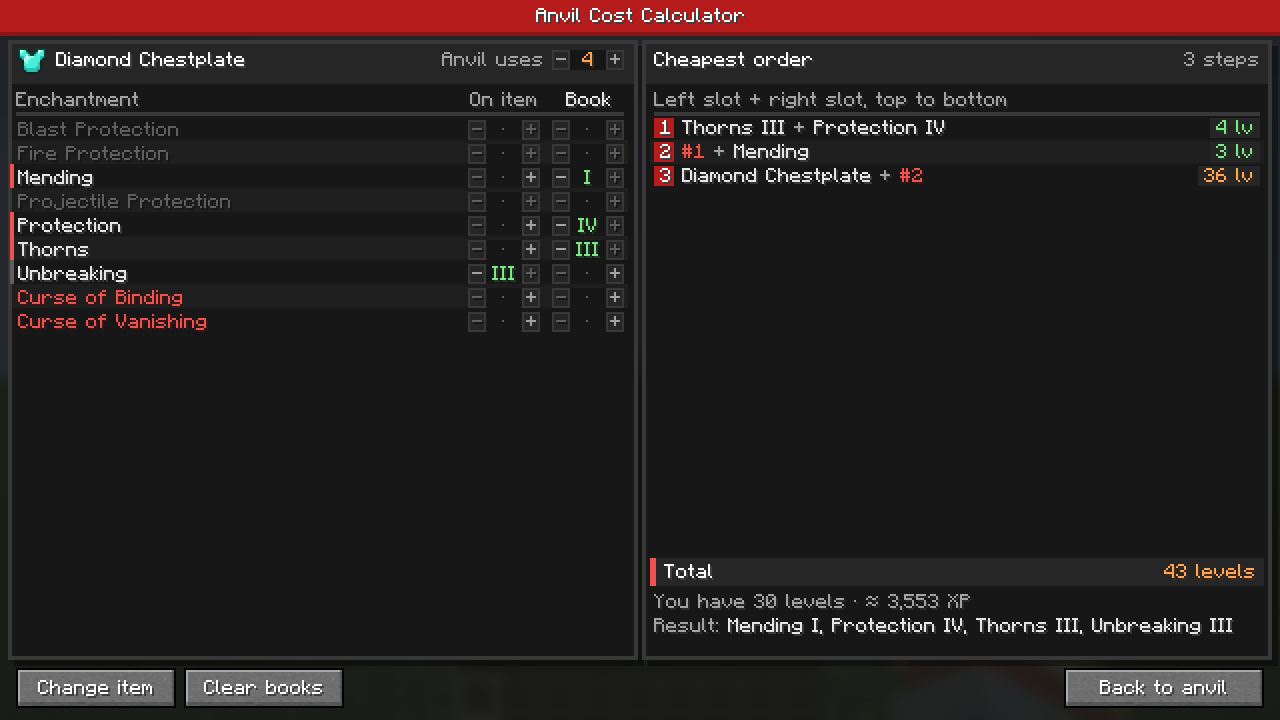
Earlier anvil uses are where most plans go wrong, and where the planner helps most. This diamond chestplate has been through an anvil four times already, so anything you add to it starts at 15 extra levels. Adding three books one by one would hit Too Expensive; the planner merges the books into one first, so the chestplate only goes through the anvil once more and stays at 36.
How costs are worked out
The math is the game's own anvil formula, step for step:
- Both inputs bring their prior work (the anvil-use penalty above), and the result's penalty doubles plus one.
- Each enchantment costs its anvil cost times its resulting level; books pay half.
- Two equal levels merge one level up (Sharpness IV + Sharpness IV = Sharpness V), capped at the max.
- Each conflicting enchantment adds 1 level and is dropped.
Up to 8 books, the planner tries every possible order and picks the cheapest that keeps every step under 40. With more books it switches to a quick plan that pairs books evenly, and says so under the total. In creative mode there is no 40-level limit, so it simply goes for the cheapest order.
The tooltip line
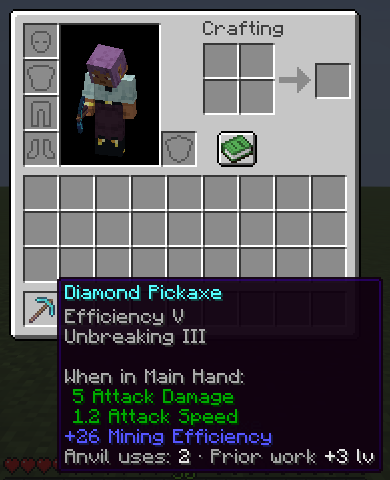
Items that have been through an anvil get one extra tooltip line everywhere you see them: how many anvil uses, and how many levels that adds to the next operation. Once an item can no longer be worked in survival the line turns red and reads (maxed).
What it leaves alone
- The anvil works exactly like vanilla. The planner only does arithmetic; it never changes costs, results or items.
- Nothing runs on servers. Dedicated servers never load any of this code, and no packets are sent. It works on vanilla servers.
- The planner remembers your last setup until you quit the game, so you can hop back to the anvil and return.
Performance
Nothing runs while the planner is closed besides one tooltip line. The plan is recalculated only when you change something, and even an 8-book exhaustive search takes a few dozen milliseconds at most.